Add an image carousel to WordPress
Framed pictures that take turns, in a row, a deck, a scatter of prints, a mosaic, stepped columns, a spotlight or a turning orbit. They step by themselves, or by arrows, drag and swipe.
Type
A Grinner block
Find it
Press + and search “Image Rotator”
Phones
Swipe to step, and the new layouts change shape below 560px wide
Speed
Its code arrives only on pages with a rotator

Pictures that take turns.
This is the real Image Rotator block, running on this page.



Settings Transition Centre Stage Visible at a time 3 Show controls On hover
Or round and round.
The same Image Rotator, set to Orbit.
Settings Layout Orbit Tilt (°) 14 Image Height (px) 300
The settings worth knowing.
Choose how many show, then a transition that suits that number.
Transition
Eight transitions
In the Row layout, Slide and Snap work with any number, Fade, Zoom, Pixel Reveal and Card Drop need one at a time, and Centre Stage and Carousel Flow need three or five.
Layout
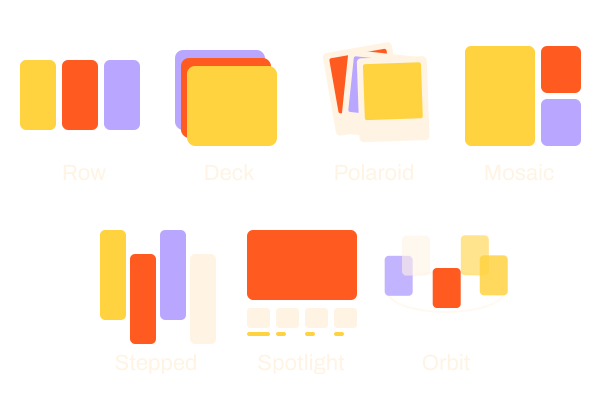
Seven layouts
Row, Deck, Polaroid scatter, Mosaic, Stepped columns, Spotlight and Orbit. Image Height (px) sizes every one.
Show controls
Arrows or not
Always, on hover or hidden. Drag and swipe keep working either way.
Focus treatment
Quieter sides
Turn, dim or gray the side pictures so the middle one leads.
Three steps. No new tool.
Fair questions.

Make your next site beautiful.
GrinBot designs and builds it for you. Join the waitlist for the launch price.
- Studio-quality design
- Built for speed
- Pay once, no subscription
We’ll email you about the launch. Unsubscribe any time. Privacy policy