Add a countdown timer to WordPress

A timer ticking down every second to a date you set, as boxes, flip cards, words or a single line. At zero it shows a message or hides itself.

Type

A Grinner block

Find it

Press + and search “Countdown”

Phones

Its own digit size on phones keeps the units on one line

Speed

Its script arrives only on pages with a countdown

What you can change

The settings worth knowing.

The clock’s look, its size, its units and what happens at zero.

Boxes

Offer ends 31 December 2026, 23:59 GMT+0000
This offer has ended

Inline

Offer ends 31 December 2026, 23:59 GMT+0000
This offer has ended

Worded

Offer ends 31 December 2026, 23:59 GMT+0000
This offer has ended

Flip

Offer ends 31 December 2026, 23:59 GMT+0000
This offer has ended

Clock type

Four clocks

Boxes, a plain Inline line, Worded such as 1 day, 5 hours, or Flip cards that fold.

Offer ends 31 December 2026, 23:59 GMT+0000
This offer has ended
Offer ends 31 December 2026, 23:59 GMT+0000
This offer has ended

Size

Digit size

From 16 to 96px, with a separate size below 768px. Labels and gaps scale with it.
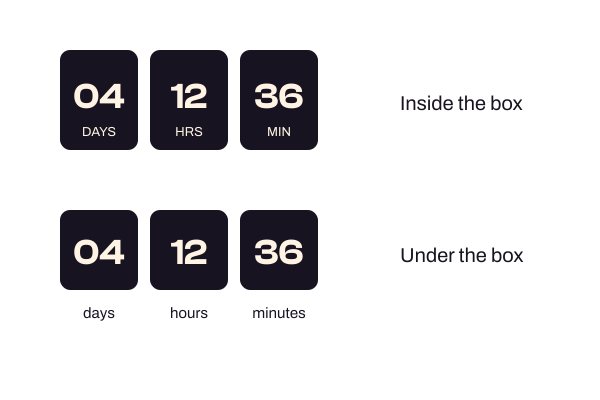
Countdown labels, boxes with labels inside and the same boxes with labels underneath

Label position

Where labels sit

Inside the box or under it, in capitals or as you typed them. Labels never go below 11px.

Offer ends 30 September 2026, 23:59 GMT+0000
This offer has ended

When expired

At zero

Show your own message, or hide the block completely.

How to add it

Three steps. No new tool.

1

Install Grinner free

It’s on WordPress.org. Or go to Plugins, Add New, and search for Grinner Blocks.

2

Add Countdown

Press + and search for Countdown, then set the date and time.

3

Choose the clock

Pick a clock type, a caption and what happens at zero, then publish.

Good to know

Fair questions.

The Countdown is a Grinner block that ticks down every second to a date you set, as boxes, flip cards, words or a single line. At zero it shows a message or hides itself. Use it for launches, sales and event deadlines.

No. It counts down to one fixed date, with no repeating or evergreen timers.

No. With days hidden it shows only today’s hours.

Yes. Set Size on phones for screens below 768px, so the units stay on one line. 0 keeps the same size everywhere.

The digits change instantly with no fold, and the timer keeps ticking.

Pairs well with

Try it with these.

A call to action that stays on screen as the page scrolls.

Turn a section, or each block in it, into a card with one switch.

Numbers that count up or shuffle into place as they scroll into view.

Grinner grinning

Go make something
beautiful.

Free on WordPress.org · No Pro version