Build a comparison table in WordPress
A grid with even lines between cells, where every cell can hold any blocks. It reflows neatly on phones and can reveal cell by cell.
Type
A Grinner block
Find it
Press + and search “Table”
Phones
Cells reflow to the phone columns you set
Speed
No script to load

Side by side, cell by cell.
This is the real Table block, running on this page.
Tea
Coffee
Hot chocolate
Caffeine
A gentle lift
The big one
Barely any
Best time
Mid afternoon
First thing
A cold evening
Biscuit
Digestive
Biscotti
Shortbread
Settings Columns 4 Column widths 2 / 1 / 1 / 1 Mobile columns 2 Reveal Fade Up
The settings worth knowing.
Columns per screen, cell roles, lines and an entrance.
Mon
Tue
Wed
Thu
Yoga
Swim
Rest
Run
Columns
Columns for each screen
From 1 to 8 on desktop, with separate tablet and phone columns.
Small
Large
Mug
250ml
400ml
Price
$2
$3
Style first row as header
Header row and empty corner
Make the first row a header, and set any cell to Spacer to leave a clean, empty corner.
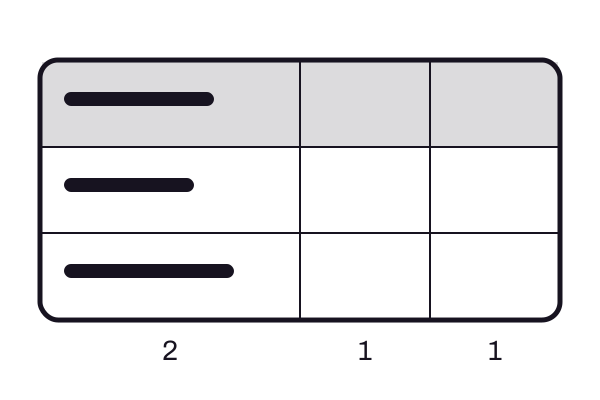
Column widths
Wider columns
One number per column, such as 2 / 1 / 1, makes the first column twice as wide. Tablet and phone columns stay equal.
Room
Seats
Garden
12
Library
8
Line width
Lines and colors
Inner lines from 0 to 8px in any palette color, and an outer border from the Styles tab that can differ from them.
Three steps. No new tool.
Fair questions.

Make your next site beautiful.
GrinBot designs and builds it for you. Join the waitlist for the launch price.
- Studio-quality design
- Built for speed
- Pay once, no subscription
We’ll email you about the launch. Unsubscribe any time. Privacy policy